Virtual Staging NYC: When It Makes Sense for an Empty Listing
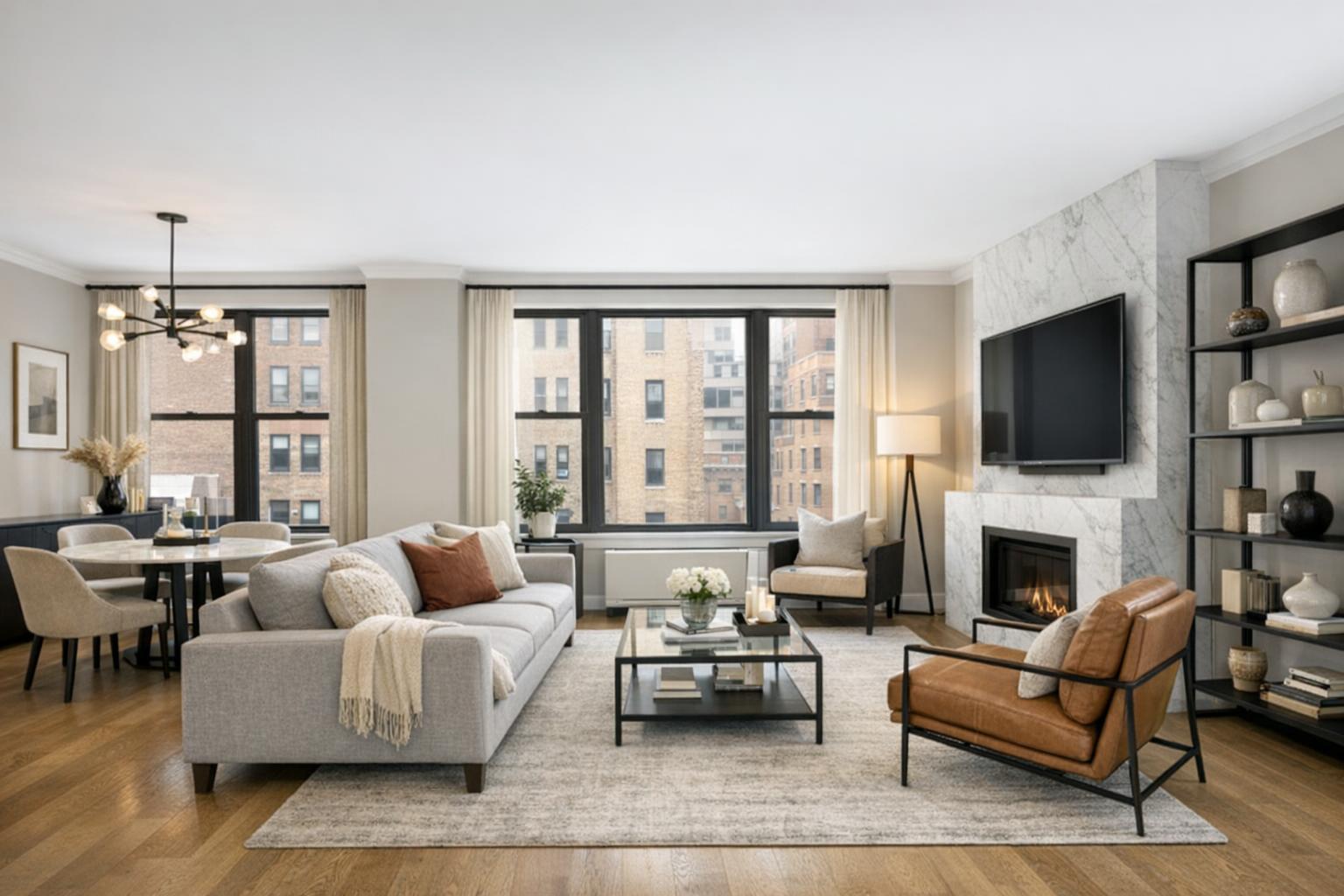
Virtual staging NYC enhances a modern living room with elegant furnishings, a marble fireplace, and large windows overlooking city buildings.
Virtual Staging NYC: When an Empty Listing Needs More Than a Blank Slate
Virtual staging NYC has become a go-to solution for agents, brokers, landlords, and property managers aiming to present empty apartments, condos, brownstones, and rentals in their best light. If you’ve worked with NYC or New Jersey properties for any length of time, you’ve most likely faced the challenge: an empty room can leave a lot to the imagination and, just as often, raise unnecessary questions in a listing gallery. For real estate professionals juggling tenant transitions or owner move-outs, this is a familiar dilemma.
It’s common for listings around NYC and northern New Jersey to be shot in the “in-between” — after a resident leaves, but before the next one moves in. Clean, blank rooms sound tidy in theory, but in practice, their scale, intended use, and even visual appeal can get lost in photography. Virtual staging brings context to those vacant spaces, clarifying not just what the room is, but what it could be.
Why Empty Listings Often Need Digital Furniture Staging
Empty-room photos are simple, but simplicity comes with trade-offs. Without anything in the frame to lend a sense of scale, even a generously sized living room can appear tight. Odd alcoves lose their potential. Frustratingly, unique architectural details like moldings or fireplaces may blend into the background without furnishings to help anchor them visually.
This isn’t just an aesthetic issue. In older NYC apartments, townhouses, or even modern condos with open layouts, intended use isn’t always obvious. A long parlor begs the question: is this for living, dining, working from home, or a blend? For smaller bedrooms, can that space fit a queen bed — or just a twin and desk? Photographs rarely answer these questions without some guidance.
Professional digital furniture staging gives the viewer a frame of reference. Done correctly, it overlays realistic furnishings and decor onto the original photograph, keeping permanent details like windows, flooring, and walls unobscured. The point isn’t to redesign: it’s to illustrate one plausible use for the room, making the potential clear without misrepresenting what’s actually there.
How Virtual Staging Works — and What Matters Most
Virtual staging is not about transforming a property into something it’s not. The best results start with clean, accurate photography of the actual room as it exists — empty or properly decluttered. Realistic digital furniture and decor are then added, keeping in mind:
- The underlying proportions and permanent features of the space.
- Window placement and direction of natural light.
- Room boundaries, ceiling heights, door swings, and architectural details.
- Kitchen appliances, bathroom finishes, radiators, and other immovable elements.
In practice, this means the staged image should never invent a new layout, hide significant elements, or imply a renovation that hasn’t occurred. If the living room opens into the kitchen, that connection should be visible. Mantels, built-ins, and flooring shouldn’t vanish behind virtual sofas. Everything that matters for an agent, buyer, or renter making a decision should remain visible and honest.
When Virtual Staging Is Especially Useful
Not every empty listing needs digital furniture — but many do. Here are some of the most common use cases we see at RealtaSnap:
- Newly Vacant Listings: After a seller or tenant moves out, images are often shot in untouched, empty rooms. Staging select hero images (like the living room, primary bedroom, or dining nook) can help buyers and renters immediately identify how space functions, while other rooms may remain unstaged for transparency.
- Flexible or Multi-Use Spaces: A room that serves as an office, den, nursery, or formal dining area depending on the resident might be confusing in photos. Virtual staging can offer one possible arrangement; if the flexibility is a selling point, a second staged version can sometimes clarify alternate uses — as long as the edits stay anchored in reality.
- Small or Oddly Shaped Rooms: Spaces that might seem awkwardly sized in person are even tougher to interpret in photos. The right choice of digital furnishings (appropriately sized and not overdone) can make scale, walkways, and usability clearer.
- Rentals Between Tenancies: For landlords and property managers, physically staging rentals between short lease cycles is often impractical. Virtual staging offers a practical alternative, modernizing the listing without logistical hassle.
In all these situations, the strongest listings tend to blend staged images (for context) with unstaged photos (to show what’s real). Leading with a digitally staged living room and following up with bare images of the same space gives both context and honesty.
Style Choices: Keeping Staging Realistic and Relevant
Furnishing style matters, even when it’s digital. The key is to complement the property rather than compete with it:
- Classic NYC brownstones or Upper West Side co-ops: Typically suit warm textures and simple, traditional pieces that let original woodwork or period details stay visible.
- Modern condos: Look best with streamlined, contemporary furniture that doesn’t fight with glass, steel, or open layouts.
- Compact rentals: Do well with space-saving pieces, keeping circulation paths clear and highlighting storage without making the room feel tight.
- Downtown lofts: Benefit from modern layouts while making sure to showcase exposed brick, beams, or unique windows.
Consistency across staged photos helps. If the living room and bedroom are both staged, the style should feel like it belongs in the same home rather than a mishmash.
Operational Know-How: Getting the Most From Your Virtual Staging
Based on our experience supporting NYC and New Jersey listings, a few core production tips make all the difference with digital staging:
- Start with an empty or properly decluttered room. Virtual staging overlays work best on spaces that are genuinely vacant. Digital furniture should never cover existing items, as this risks odd overlaps and unrealistic shadows.
- Capture wide, level, and well-lit images. Straight verticals and clear exposure help viewers interpret room size and features, and ensure the staging looks natural when added.
- Maintain property transparency. Disclose when an image is virtually staged, either with a caption in the listing gallery or, where possible, as an image overlay. This builds trust and maintains compliance with best practices.
- Reserve physical staging for high-impact luxury or development projects. For most busy urban listings, virtual staging accelerates turnaround and minimizes onsite hassles, but there are occasions (especially in premium markets) where physical staging is still the right call.
Limitations and Best Practices
AI virtual staging is designed for empty or fully decluttered rooms. If there is still existing furniture or storage present in the space, RealtaSnap recommends removing these items before the photography appointment. Where needed, simple clutter-removal edits can be done first — but digital staging should never be layered over couches, beds, or scattered boxes. This ensures clean, professional-looking results that put the real property first.
Choosing a Virtual Staging Company in NYC
Not all virtual staging is created equal. If you’re comparing providers, here are a few important criteria:
- Work from current, professional listing photos — ideally shot on location by a real estate specialist.
- Preserve visible room features, maintaining architectural and design integrity.
- Offer realistic furniture scaled to fit the property’s dimensions and layout.
- Apply digital staging only to empty (or fully cleared) rooms. Covering existing objects usually leads to subpar results.
- List straightforward pricing for staging per photo, with no hidden extras.
- Provide additional listing media (photography, floor plans, video, etc.) when needed for a seamless package.
At RealtaSnap, virtual staging for empty spaces is currently $10 per photo. We also provide both basic and advanced clutter removal services, as appropriate, to prepare images for staging.
For a full overview of our real estate media offerings — including professional on-site photography, AI virtual staging, floor plans, and more — you can explore all our services here.
Getting Started With an Empty Listing
If you’re planning to market a vacant NYC or New Jersey property, establish a photo plan before booking virtual staging:
- Identify which rooms are most in need of context or scale.
- Decide whether staged and unstaged images will help clarify the property.
- Make sure rooms are vacant or decluttered before the scheduled photography.
- Prepare any utility rooms, kitchens, or baths as needed (these are usually best left unstaged if finishes already show well).
Whether you need only a few hero images or more comprehensive coverage, RealtaSnap makes it easy to stage select photos rather than the entire set. That keeps things cost-effective and accurate, while still helping viewers understand the space.
If you’d like help coordinating listing photography and digital staging for an upcoming vacant property, visit www.RealtaSnap.com for more information and to schedule media capture.
FAQ
Question: How should I decide which rooms to virtually stage in an empty listing?
Answer: Focus on the rooms that most benefit from added context — typically living spaces, primary bedrooms, and flexible-use areas. Kitchens, bathrooms, and closets usually read well as clean, empty rooms, so consider staging only where scale or intended use wouldn’t be obvious otherwise.
Question: Can virtual staging be added over existing furniture or clutter?
Answer: Virtual staging should be used on rooms that are fully vacant or have been properly decluttered. If there is still furniture or significant clutter, it should be removed before photography or digitally edited out first. Staging on top of existing objects rarely produces a clean or convincing final image.
Question: Does virtual staging indicate what furniture comes with the property?
Answer: Digital staging shows a possible furnished arrangement for an empty room, but it’s purely illustrative. Unless otherwise noted in the property description, staged items are not included in the sale or rental. It’s good practice to label virtually staged photos with a clear caption to avoid confusion.