Virtual Staging NYC: How to Prepare a Vacant Listing for Digital Furnishing
A comparison of an empty room and a beautifully furnished living space highlights the impact of virtual staging NYC.
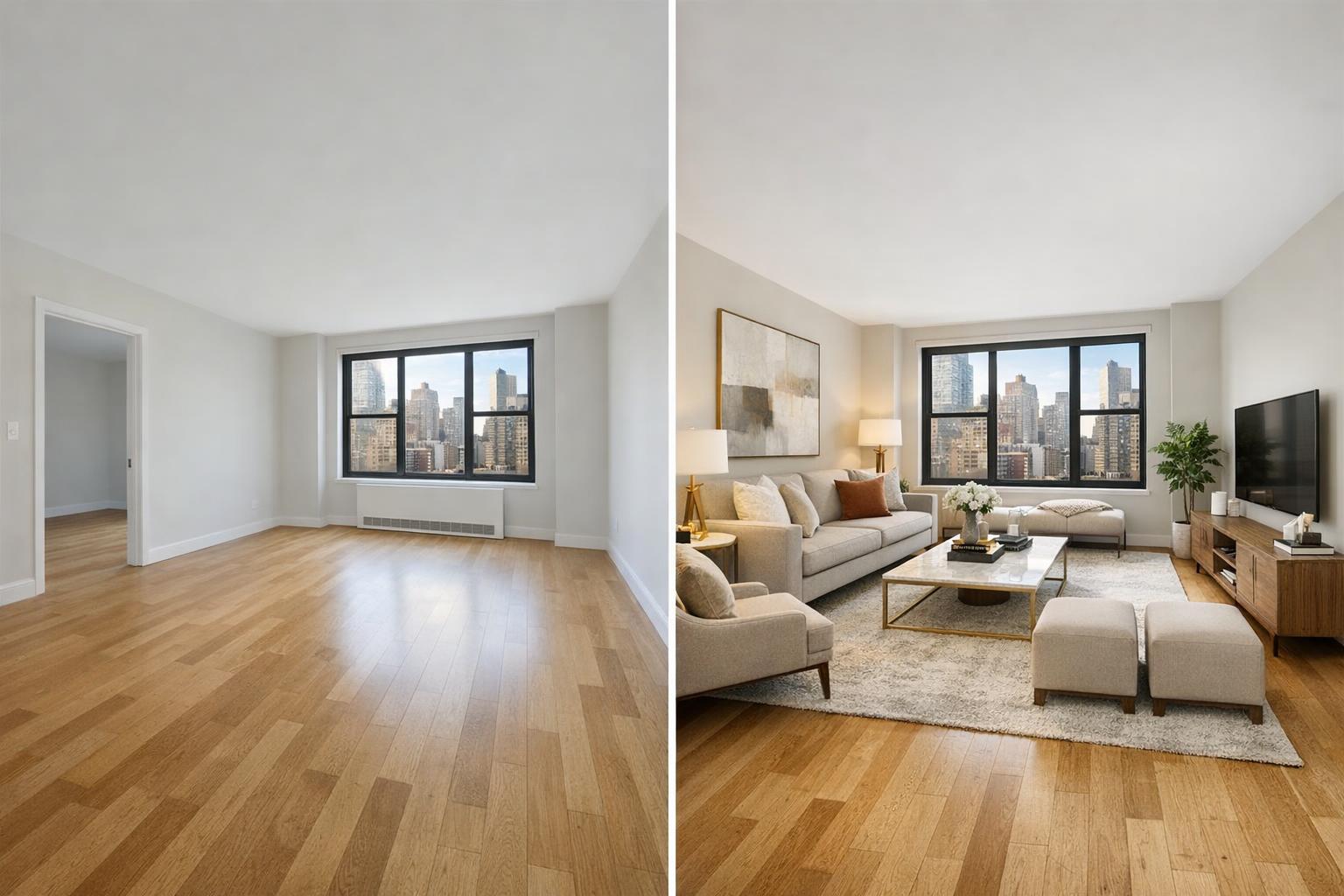
Virtual Staging NYC: An Expert Approach to Preparing Vacant Listings for Digital Furnishing
Virtual staging NYC has become a practical and effective tool for real estate professionals looking to make vacant apartments, condos, and brownstones easier to understand—before a potential buyer or tenant ever sets foot inside. Empty spaces, even with sharp photography, often leave a lot to the imagination: “Where would the sofa go? Does a queen bed fit in that second bedroom? Could this alcove work as a functional office?” Digital furnishing helps bridge this visual gap, providing thoughtful, realistic context without the logistics or cost of physical staging.
What Virtual Staging Actually Offers Empty Listings
Virtual staging involves digitally inserting furniture, rugs, decor, and lighting into photographs of real, vacant rooms. The result is a series of images where the underlying architecture—the walls, windows, floors, and finishes—remains true to the property, but a curated arrangement of furniture gives clear reference points. Viewers can quickly assess scale, imagine everyday use, and picture themselves living there.
This distinction is key: Virtual staging isn’t a replacement for honest, well-composed photography or a tool to disguise a property’s real condition. It’s an editorial layer that complements—and should never misrepresent—the authentic feature set of a listing. For New York City properties (especially compact Manhattan apartments and sprawling Brooklyn brownstones), these digital furnishings solve practical problems:
- They clarify furniture placement and room function
- They demonstrate true scale (helping counteract misleadingly large or small-looking empty rooms)
- They illustrate flexible space usage, which is essential in neighborhoods where layouts often don’t follow suburban convention
Thoughtfully executed, AI furniture staging for vacant listings ensures that potential buyers, renters, or investors aren’t left wondering how a space could actually work in daily life.
Starting With Well-Composed, Honest Photography
Virtual staging services in NYC are only as effective as the photos they build on. Clean, empty-room images with straight lines, visible architectural features, and useful perspectives provide the foundation. In practice, property galleries should ideally show both:
- At least one clear, empty-room photo (accurately depicting flooring, windows, closets, and wall colors)
- A virtually staged photo from the same vantage point (to illustrate a possible arrangement)
Having both on hand lets prospective buyers or tenants see the unvarnished reality and appreciate the possibilities that virtual staging can offer. Labeling digitally furnished images as virtually staged is not just transparent—it also helps maintain trust and sets realistic expectations.
For real estate agents and owners, planning for virtual staging should start before the photographer arrives. Well-chosen camera angles, balanced window exposure, and honest representation of the room’s shape are essential for producing the kind of images that enhance, rather than undermine, the digital staging process.
Which Rooms Benefit Most From Digital Furnishing?
Not every space in a property needs virtual staging; in fact, over-furnishing a listing gallery can feel forced or look artificial. In our experience with media production for NYC and New Jersey properties, the rooms that benefit most are the ones where function or scale may not be obvious:
Living Rooms and Open Living Areas
Living rooms are often the first place buyers and renters picture everyday life. Wide walls and open layouts, especially in lofts or newer condos, can feel ambiguous in a photo without furniture. A virtual sofa, chair, and coffee table can anchor the space—making it easier to understand seating, sightlines, and walkways, without turning the room into a virtual showroom. Less is usually more.
Bedrooms
Bedrooms benefit from familiar scaling: a bed, bedside tables, and a dresser help a viewer instantly gauge practical fit. For primary suites, accurately scaled queen or king beds communicate size without stretching believability, while modest arrangements work better for smaller bedrooms. Bedrooms should always be staged with realism in mind; oversized virtual furniture can make even spacious rooms look cramped and vice versa.
Dining Areas
NYC apartments often have open culinary spaces or small nooks that could serve multiple purposes. Virtual staging works well to clarify which spot functions as a dining area—whether that means showcasing a rectangular table near the kitchen or a round table in a tight corner. The key is to select furniture that matches not just the dimensions but the expected flow of the space.
Flexible Spaces and Home Offices
Alcoves, bonus rooms, dens, and oversized landings tend to puzzle buyers viewing a vacant space. Here, digital staging can present more than one functional use: a compact home office setup in one image, a reading nook or guest sleeping area in another. Each image should stay true to the property—never adding or suggesting features that don’t actually exist.
Real-World Preparation for Digital Staging
For virtual staging to look convincing, the starting photograph must show the room as empty (or at least fully decluttered). RealtaSnap’s workflow is built on this principle:
- Remove all furniture, boxes, cleaning supplies, personal items, window coverings, and clutter from the rooms to be staged
- If furniture cannot be physically removed, schedule an advanced clutter-removal edit prior to virtual staging
- Keep architectural details (molding, radiators, built-ins) visible to anchor the digital furniture in reality
Virtual staging is never applied directly over occupied or semi-furnished rooms. Simply put: the cleaner the starting space, the more credible the final, digitally furnished result. This policy also helps maintain listing integrity and reduces the risk of mismatched shadows, scale issues, or digital artifacts that can erode trust.
Choosing Styles That Work With Your Listing
Good virtual staging supports the property rather than drawing attention to itself. The right style varies with the home:
- Contemporary condos often call for clean-lined furniture in neutral tones
- Historic brownstones may benefit from warmer palettes and timeless, restrained textures
- Rental listings typically do best with approachable, practical arrangements that show true function over decoration
When planning a style, consider these questions:
- Does the furniture fit the available space (not oversized or under-scaled)?
- Are walkways around major items believable?
- Does the room composition respect actual doors, windows, and built-ins?
- Are accessories sparse enough to keep the room feeling open?
- Does the staging serve a clear purpose, matching the likely use a buyer or tenant would imagine?
For New York City and New Jersey properties, correct scale is particularly important. Virtually squeezing a king bed into an undersized bedroom, or placing an oversized sectional in a narrow living room, can send the wrong message and waste a valuable opportunity to guide the viewer.
A Practical Workflow for Agents and Property Owners
Virtual staging is most effective when it’s included in your initial listing plan, not as a last-minute fix. Here is a typical workflow for property owners and agents:
- Identify the vacant rooms that need visual explanation (not every room)
- Fully clear those rooms or plan for clutter-removal editing
- Schedule professional photography, adding AI virtual staging as needed
- Communicate any special requests for style or function (e.g., “show this alcove as a workspace”)
- Review and publish both original and virtually staged images, clearly labeling the staged versions
With RealtaSnap, virtual staging is available as an add-on to any standard photo package. Each staged photo is priced at $10, and clients can select the exact rooms they want virtually furnished when booking a shoot.
You can book directly or see more details at www.RealtaSnap.com.
Digital Furnishing as a Visual Guide, Not a Disguise
At its core, virtual staging is most valuable when it helps explain, not obscure, a space. When paired with accurate vacant-room photographs, digital furnishing can help real estate agents, sellers, and landlords in NYC and New Jersey turn hard-to-visualize spaces into actionable opportunities for buyers and tenants.
If you need both property photography and AI virtual staging for your next listing, or if you have questions about preparing a vacant unit for optimal results, RealtaSnap can help you put a clear, credible presentation together.
For straightforward booking, property-specific policies, and more service information, visit www.RealtaSnap.com.
FAQ
Question: How does virtual staging differ from physical staging?
Answer: Physical staging brings real furniture and accessories to the property for photography and showings. Virtual staging, on the other hand, digitally adds furniture into photographs after the shoot—making it a practical and cost-effective option for vacant listings, especially when the goal is to help viewers understand layout and scale before an in-person visit.
Question: Can you virtually stage rooms that already have furniture or other items?
Answer: AI virtual staging is designed for use in vacant or fully decluttered rooms. If furniture or clutter remains, it must be physically removed prior to capture, or a clutter-removal edit must be requested first. This keeps the virtual staging believable and ensures the room is accurately represented.
Question: Should virtually staged photos be marked or disclosed in listing materials?
Answer: Absolutely. Clearly labeling virtually staged images helps set accurate expectations and maintains trust with buyers and renters. It’s also helpful to include both empty-room and virtually staged versions in your gallery, so viewers can appreciate the real space as well as one possible arrangement.