Virtual Staging in NYC: When It Makes Sense for a Vacant Listing
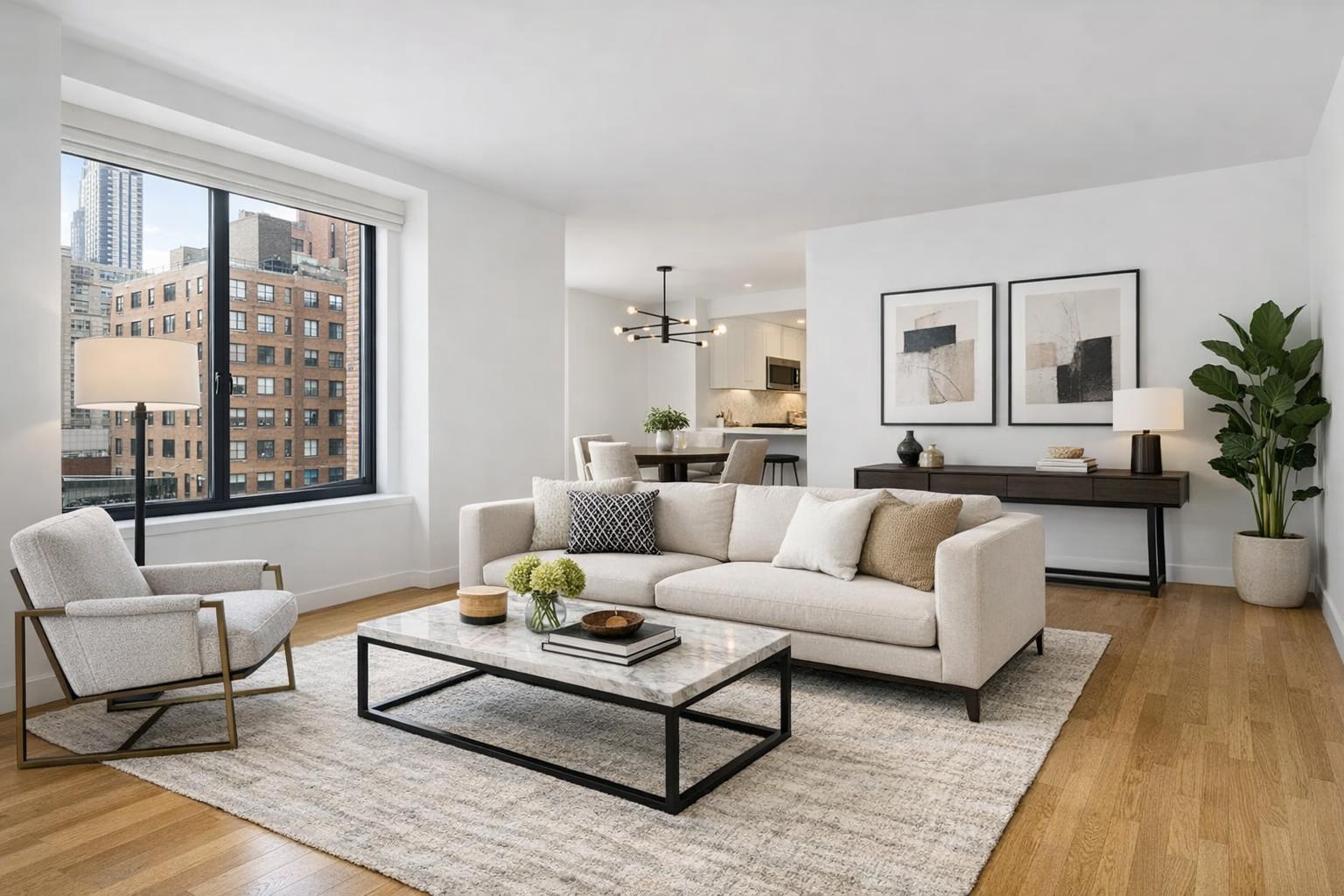
A beautifully designed living space showcases virtual staging NYC, featuring a modern sofa, abstract artwork, and a view of urban architecture through large windows.
Virtual Staging in NYC: When It Makes Sense for a Vacant Listing
Virtual staging in NYC is a decision many agents, property managers, and owners consider the moment an apartment, condo, brownstone, or new-development unit is ready for market—yet still completely empty. While a vacant space puts every finish and architectural feature on full display, listing photos without furniture often leave buyers and renters with more questions than answers. What’s the real scale? How would this odd nook actually work? Where does the living room end and kitchen begin in a wide-angle shot of an open floor plan?
In high-density markets like New York City and New Jersey, where every square foot counts and layouts can be unconventional, translating a raw, unfurnished space into something visually inviting takes more than just professional photography. Virtual staging—adding digital furniture to clean, empty rooms—offers a way to bridge that gap, but it’s worth understanding where it fits (and doesn’t fit) in a serious property marketing plan.
The Challenge of Photographing Vacant Spaces
Empty rooms may be honest, but they’re not always helpful to the viewer. In a market like Manhattan or Brooklyn, spaces can be compact, eccentric, or multi-purpose by necessity. A living room may double as a home office, a dining alcove might also serve as a den. Without any cues—no couch to ground the room, no bed to signal a bedroom’s proportions—photos can feel cold, ambiguous, or even misleadingly small.
A well-placed sofa or desk answers a pragmatic question instantly: “Will my sectional fit here?” or “Could this be a real guest room, or is it just an awkward alcove?” That’s the difference good virtual staging NYC services aim to capture: using digital furniture to provide scale and intention, not fantasy.
What Professional Virtual Staging Actually Adds
Digital furniture staging isn’t about making a room look trendy or adding decorative flair. At its core, it’s meant to clarify space and flow for potential buyers or renters. By overlaying realistic, proportionate furnishings onto a clean image of an empty room, staging provides visual benchmarks—a queen bed, a dining table, a pair of armchairs—so viewers can understand not just what the room is, but what it could reasonably become.
Room-by-room, virtual staging helps:
- Demonstrate how tight living spaces in Manhattan apartments can still accommodate daily life
- Establish a central function for ambiguous bonus rooms in Brooklyn brownstones
- Show multiple possibilities in flexible den areas or convertible layouts
- Bring warmth and organization to larger, blank canvases in new development or model units
For the results to feel trustworthy, the original photograph needs to be sharp, well-composed, and true to the physical property. Layout, wall placement, light, windows, and architectural elements must all remain as-captured.
Staging Is About Fit—Not Hype
Not every property or room benefits equally from virtual staging services in NYC. The practical value is greatest when:
- A space is fully vacant or professionally decluttered
- Room function isn’t obvious from the raw floor plan or photography alone
- Competitive market pressure makes first impressions matter more
- There’s actual uncertainty about scale, use, or lifestyle potential
It is not meant for concealing flaws, hiding permanent issues, or masking heavy wear and tear. Nor should it be used to suggest a room can function in ways that don’t make sense given its size or features. The best virtual staging matches both the property’s aesthetic—think classic for an Upper West Side co-op, clean contemporary for a Long Island City condo—and the kind of occupancy likely to attract serious interest.
Vacant vs. Furnished: A Clear Distinction
Virtual staging is intended for rooms that are empty. When furniture, large décor, or clutter remain in the space, digital staging becomes much more complicated—and less convincing. Overlaying a sofa on top of an existing bed, or trying to “remove” all pre-existing items in post-production often results in awkward, artificial-looking images that undercut the property’s credibility.
RealtaSnap, like most professional providers, only applies AI virtual staging to rooms that are truly vacant or properly cleared out. If furniture is present, owners or agents should plan either:
- Physical removal before the photo shoot, or
- Ordering an approved clutter removal edit (basic removal: $20 per image for up to five small items; advanced removal: $40 per image for up to ten larger objects).
This policy keeps the final result realistic. Heavily furnished rooms are rarely good candidates for virtual staging unless they are genuinely cleared first.
Photography Quality Matters—A Lot
The base photo dictates the believability of virtual staging. Even the best digital furniture will fall flat if it floats above a slanted floor, sits in front of overexposed windows, or obscures key features. Professional real estate photographers know to:
- Maintain level verticals, especially in older NYC buildings or two-story New Jersey homes
- Compose images to capture doorways, windows, and flow between connected rooms
- Balance exposure so that natural light (and valuable exterior views) are visible but not blown out
- Avoid wide-angle distortion that exaggerates room size
The cleaner and more informative the original photo, the more credible and attractive the staged image. This is why RealtaSnap recommends planning for both professional photography and virtual staging from the outset, rather than trying to patch together a solution after-the-fact.
Where Virtual Staging Tends to Make the Most Sense
Through years of working with listings across New York City and New Jersey, certain property types consistently benefit from virtual staging:
- Fully vacant apartments and condos: Especially studios and one-bedrooms, where the absence of a bed, sofa, or table can make the space feel smaller than it actually is.
- Townhomes and brownstones: Multi-level properties often have ambiguous rooms—parlors, rec rooms, garden-level flex spaces—that need a little narrative in photos.
- New development and model units: When furniture installation can’t keep pace with a marketing schedule, digital staging helps present a full, move-in ready look across several floor plan variations.
- Rooms with flexible potential: Dens, home offices, or bonus spaces don’t always need to be staged the same way as in-person showings. One virtual layout can highlight a plausible use while leaving the possibilities open in the listing copy.
Room Selection: Thoughtful, Not Blanket, Application
There’s no need to stage every photo in a listing. Selective, strategic use of digital furniture keeps the gallery visually clear and focused. Prioritize:
- Primary living areas (especially when scale or function is unclear)
- Bedrooms that appear ambiguous when unfurnished
- Dining areas or alcoves that may otherwise look like wasted space
- Dens, offices, or convertible rooms needing a clear suggestion
Some rooms—such as showpiece kitchens, bathrooms with distinct finishes, or spaces where architectural features shine—stand well enough on their own.
Being transparent in the listing (“Virtually staged” noted on the image) is also best practice, so that buyers and renters know exactly what’s real and what’s illustrative.
Cost, Workflow, and Booking Process
For agents and owners considering their media plan, budget and workflow are practical factors. RealtaSnap prices AI Virtual Staging at $10 per photo, added on top of the base photo package. By charging per image, clients can concentrate resources on rooms where staging matters, rather than applying it generically across the board.
The booking process is simple:
- Start at www.RealtaSnap.com
- Input the service address and any custom entry details
- Select photography and, where needed, add AI Virtual Staging (as well as options like clutter removal)
- Choose an available shoot time
- Add relevant notes and pay securely at confirmation
A clear communication about which rooms will be empty, which need clutter removal, and what furniture style aligns with the listing helps streamline the entire process.
For more details on booking workflow, refer to the prep guide and booking process or direct booking page.
Best Practices and Professional Guidance
From an operations perspective, the most effective virtual staging projects share a few traits:
- Rooms are genuinely empty or decluttered before capture
- Reference images, style preferences, or comparable listings are shared up front when there’s a specific design vision
- The property’s real light, layout, wall placement, and finishes remain visible
- Only plausible quantities and sizes of furniture appear in the images (oversized or over-accessorized rooms contribute to skepticism)
In New York and New Jersey properties, layout quirks and space constraints sometimes call for creative solutions. But keeping edits within the realm of possibility helps maintain the listing’s trustworthiness.
When Not to Use Virtual Staging
If a room’s existing features are distinctive and easily understood, or if a single, unambiguous use is clear from the empty photo (a dramatic kitchen, a sunroom with floor-to-ceiling windows), virtual staging may not add much value.
It’s also best to avoid digital staging as a “fix” for significant physical clutter, dated interiors, or major maintenance issues. Buyers and their agents will notice these things upon touring in person. Authenticity is more valuable than a visually perfect—but misleading—first impression.
A Smarter Way to Present Vacant Space
For listings facing the common challenge of presenting an empty space, virtual staging can be the difference between confusion and clarity. By focusing on realism, room purpose, and visual honesty, it helps turn a blank canvas into a compelling, functional home—without altering any physical details.
When you're weighing the decision for your next vacant NYC or New Jersey listing, consider how digital furniture staging could make your media package both more efficient and more informative, while respecting the integrity of the property.
If you’d like professional listing photos and thoughtfully planned virtual staging for your next vacant property, we’d be happy to help.
FAQ
Question: Is virtual staging the right move for every empty listing?
Answer: Not necessarily. Virtual staging is most effective for vacant rooms where the intended use, scale, or flow isn’t obvious from empty photos—like compact living rooms, hybrid flex spaces, or bedrooms with ambiguous proportions. Distinctive rooms that shine on their own may not need any digital furniture.
Question: Can you apply virtual staging to a room with existing furnishings or clutter?
Answer: Virtual staging is designed for empty or properly decluttered rooms. If furniture or significant clutter is present, it should be physically removed before the photography session or handled as a paid clutter removal edit first. Staging over existing furniture isn’t recommended, as it compromises realism.
Question: How does booking virtual staging with RealtaSnap work?
Answer: Booking is handled online at www.RealtaSnap.com. Just enter your property address, select the services you want (including photography and AI Virtual Staging as needed), choose an available time, add any notes, and pay securely at checkout. You can tailor staging and add-ons to the specific needs of your listing.