Choosing Virtual Staging in NYC: What to Ask Before You Book
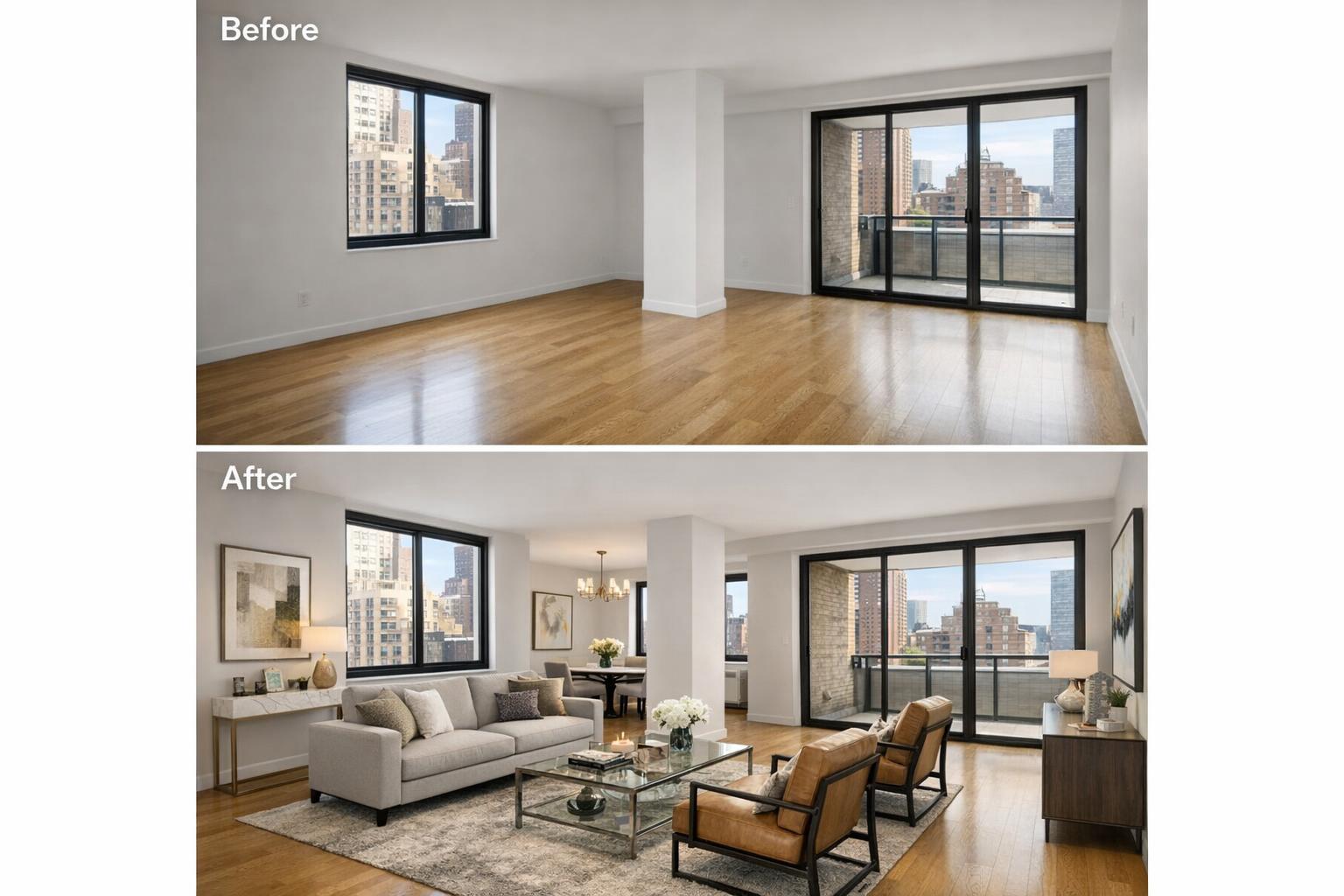
The image showcases a before-and-after transformation of a New York City apartment using virtual staging, highlighting the addition of furniture and decor to enhance the space.
Choosing Virtual Staging in NYC: What to Ask Before You Book
Virtual staging in NYC is a powerful tool for presenting vacant or lightly prepared listings. In a market defined by tight spaces and endless competition—from Manhattan apartments to Brooklyn brownstones—staging isn’t just about aesthetics. It’s a way to provide prospective buyers and renters with a clear sense of how a property can function, without masking its true layout or making promises that can’t be kept. As a company focused on real estate media in NYC, New Jersey, and nearby areas, we see virtual staging as one of those services that, when done thoughtfully, helps properties communicate their real potential.
Virtual Staging Is About Clarifying Space—Not Redesigning It
Virtual staging services in NYC are often misunderstood as a digital makeover, but at its core, the process is about visually clarifying a room’s layout and possibilities. For an empty condo living room, AI staging can suggest a believable arrangement—a sofa, coffee table, a touch of art—placing just enough within the frame to help viewers interpret dimensions without overwhelming the architecture. In a small pre-war apartment, a virtually staged photo might show a dining area doubling as a home office, providing realistic, alternate uses.
The telling factor? A good staged image lets the bones of the space speak for themselves. Original detailing, window placement, ceiling height, and architectural quirks remain visible and honest. Virtual furnishings should never suggest there’s a window where there isn’t one, cover up permanent features, or create illusions about how wide or open a space really is. Experienced providers know that New York layouts are often unique—sometimes challenging—which is exactly why accuracy gains trust.
Where AI Staging Makes the Most Impact
Certain types of listings—or moments in a listing’s lifecycle—benefit particularly from virtual staging:
- Vacant apartments where furniture has been removed for a clean slate.
- Large or unconventional rooms in Brooklyn brownstones that risk feeling cavernous or undefined.
- Rental units between tenants.
- Recently renovated spaces that don’t yet have furniture but need to showcase livability.
- Flex spaces that might read as ambiguous without context (think: “Is this a guest bedroom, an office, or a nursery?”).
In any of these cases, AI staging for vacant listings is a practical alternative to the complexities and costs of physical staging. But it does rely on well-prepared rooms and clear property features.
A professional observation: empty, well-lit rooms remain some of the most challenging to photograph persuasively because viewers can struggle to imagine scale and function. A thoughtfully staged digital image should answer these questions without crossing into the territory of fiction.
The Condition of the Room Still Matters
One of the first realities to address—especially in NYC, where space is often in short supply—is that the starting condition of a room greatly affects the outcome of virtual staging. RealtaSnap’s AI virtual staging works best in rooms that are empty or have been properly decluttered. Leftover chairs, sleep sofas, boxes, personal items, or stray décor can throw off scale, block critical features, and limit where digital furnishings can believably be placed.
Operational insight: virtual staging should never attempt to “place” a digital bed or sofa on top of real-world clutter. If a room contains existing furniture, standard practice is either to remove these items physically before capture or, when that's not feasible, to use clutter-removal editing before any new furnishings are added. For best results, consider:
- Clearing out all movable furniture and rugs.
- Removing wall décor, cords, bins, or overlooked personal/professional items.
- Making sure prominent features—fireplaces, windows, built-in shelves—remain fully viewable.
- Communicating up front whether clutter removal is needed as a separate step.
Setting the stage physically leads to a more realistic, more credible result.
Physical Staging, Virtual Staging, and Image Editing: Understanding the Differences
These terms often get used interchangeably but accomplish different things.
- Physical Staging: Brings in actual furniture and accessories, affecting both showings and photos. It requires logistics, building access coordination, and physical removal after the listing sells or rents.
- Virtual Staging: Applies digital furnishings only to the photos—so the space remains vacant during actual showings. Prospective buyers or tenants need to be informed that certain images are virtually staged so expectations are clear.
- Editing a Furnished Room: If a photo contains existing items that need to be digitally removed, that's a separate editing process. Only once the room image is truly “vacant” can it be staged virtually for a clean, consistent look.
Professionals find that setting realistic expectations around these differences helps prevent misunderstandings during listing prep and media ordering.
What to Ask Before Booking Virtual Staging for NYC Listings
Not all virtual staging services in NYC operate with the same process, attention to architectural detail, or style range. If you’re considering booking, these questions can help you focus on what actually matters:
- Can you work with my room as is? Be upfront about the property’s current state. Some virtual staging providers, including RealtaSnap, require that the room be empty or properly decluttered before AI staging can be added.
- Which rooms should be staged? Most properties gain the most value by staging only the main living area, primary bedroom, and perhaps a flexible second space. Kitchens or bathrooms rarely benefit from digital furniture unless there’s a clear visual confusion without it.
- Can I choose the style and function for each room? Effective providers will let you specify if you want contemporary, transitional, or classic furnishings, and if a second bedroom should be staged as an office, nursery, or guest room.
- Will the scale and perspective be accurate? Furnishings that look too large, too small, or oddly skewed break the illusion. It’s important that digital staging aligns with floor and wall angles, window views, and ceiling heights.
- How do you handle visible clutter, existing furniture, or challenging features? Find out whether they offer clutter removal, and whether that’s a separate service from virtual staging.
- Is the service priced per image? RealtaSnap prices AI virtual staging at $10 per photo as an add-on to any photo order. Clutter removal is a separate add-on, and reviewing your needs in advance can help you use your budget where it’s most effective.
Choosing a Staging Style That Suits the Property
Every property is different. Matching the staging style to the property is more than a matter of taste—it’s a way to make sure images feel cohesive, believable, and supportive of the listing’s value. Sleek, contemporary condos often benefit from clean lines and understated colors. Historic brownstones do better with warmer palettes and furnishings that don’t clash with original details. For compact studios or rentals, simple, functional layouts that avoid crowding are usually the smartest choice.
Consider questions like:
- Does the style match the finishes (modern, classic, industrial, minimal, transitional)?
- Is there a standout feature—like exposed brick, a skyline view, or custom woodwork—that the staging should highlight rather than obscure?
- Would a single, unified style create stronger listing photos?
- Do the staged rooms tell the property’s real story?
Avoid selecting a dramatic style just to impress in isolation. Good virtual staging is invisible in the sense that it simply helps people “see” the room itself.
Practical Booking and Preparation Insights
Successful virtual staging projects start with thoughtful planning and preparation. Some field-tested considerations:
- Decide which rooms truly need digital staging before your photo appointment.
- Prepare those spaces fully—empty when possible, or thoroughly decluttered if not.
- Provide clear instructions to your photographer, including any preferences for functionality (for example, “stage this room as a home office, not a guest room”).
- For RealtaSnap clients, AI virtual staging can be added as an option during online booking through the service’s platform. Note your priorities and access instructions. Appointments generally require at least 24 hours’ notice.
For a smooth workflow and better visual consistency, coordinate media production with property access and order notes. Learn more about media service options at RealtaSnap.
Why a Real-World Approach to Virtual Staging Matters
Virtual staging works best when it helps translate a space’s scale and function without creating confusion or disappointment at an in-person showing. The most effective staged photos in this market present:
- Clear visual clues to room size and flow
- Prominent, unobstructed features (windows, fireplaces, built-ins)
- Realistic, context-appropriate furnishings
- A direct relationship with the actual property
What’s left out can be as important as what’s added. Empty rooms, especially in city apartments or brownstones, present opportunities—but also risks—when it comes to perception. Whether in Manhattan, Brooklyn, or a New Jersey home, the goal isn’t to overwhelm or mislead, but to ensure each room “reads” easily and accurately.
Conclusion
For NYC and New Jersey real estate agents, brokers, and property owners, virtual staging is a practical and versatile approach to marketing vacant or prepped listings. When combined with professional photography and handled with operational know-how, it allows key rooms to shine and listings to present their strongest, most honest story.
If your next listing could benefit from virtual staging—and you want clarity, not confusion—visit RealtaSnap to get started.
FAQ
Question: Does a room have to be completely empty for virtual staging with RealtaSnap?
Answer: For best results, yes. RealtaSnap’s AI virtual staging works on rooms that are vacant or have been properly decluttered. If there’s existing furniture, it should either be removed before the photo shoot or handled through a separate clutter-removal edit ordered in advance. This makes the digital furnishings look clean and realistic.
Question: How many listing photos should I have virtually staged?
Answer: Focus on the spaces that will help buyers or renters understand the property’s layout and function. The main living area, dining space, primary bedroom, and sometimes a flexible extra room are usually enough. It’s more effective to thoughtfully stage a few images than to try to furnish every single photo.
Question: Can virtual staging show a bedroom or extra room used as a home office or nursery?
Answer: Absolutely. Virtual staging is a great way to suggest alternative, believable uses for an empty room. You might show a secondary bedroom as a quiet office, a guest suite, or a nursery, so long as the underlying features are visible and the new function makes sense for the space.
For more information on staging, preparation, or to schedule a media order, visit:
www.RealtaSnap.com